
IDN homograph attack
An IDN homograph attack uses similar-looking characters from different writing systems to impersonate a domain. An attacker registers a name resembling apple.com or paypal.com, using characters from Cyrillic, Greek or another script. If the browser displays its Unicode form, the difference can be hard to spot.
An internationalized domain name can use non-ASCII characters permitted by IDNA and the registry's rules1. IDNA uses Punycode and the xn-- prefix to form ASCII labels. Browsers apply separate rules when deciding whether to display Unicode. Unicode 16.0 contains over 154,000 characters2; some resemble Latin letters, depending on the font and rendering.
The characters that look alike across scripts are called homoglyphs (or confusables, in Unicode's terminology). Cyrillic "а" (U+0430) can resemble Latin "a" (U+0061), as can the pairs "о"/"o", "с"/"c", "е"/"e", "р"/"p" and "х"/"x". A name built from Cyrillic lookalikes is still a different domain, even if its displayed text resembles a familiar Latin name.
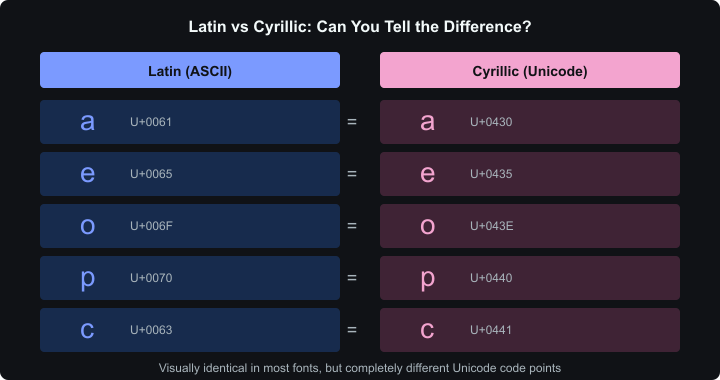 Five Latin-Cyrillic pairs with similar shapes and different code points
History
The original paper (2001)
Evgeniy Gabrilovich and Alex Gontmakher, researchers at the Technion in Israel, first described the attack in December 2001. Their paper was direct: internationalized domain names would inevitably be exploited for phishing because different scripts contain characters that look the same3. They proved it by registering a variant of microsoft.com using Cyrillic "c" and "o" in place of their Latin equivalents. The domain looked identical in a browser.
The paper appeared in Communications of the ACM in February 2002.
Shmoocon and the first live demos (2005)
The attack stayed academic until February 2005, when Eric Johanson demonstrated a practical exploit at ShmooCon4. He showed that Firefox 1.0, Safari 1.2.5, and Opera 7.54 would all render a spoofed PayPal domain (Cyrillic "a" replacing Latin "a") as the genuine paypal.com. Internet Explorer wasn't vulnerable — but only because it didn't support IDN display at all.
ICANN issued a public statement within days5. Mozilla pushed an update adding a TLD whitelist to Firefox — only domains under TLDs with anti-homograph registry policies would show Unicode; everything else fell back to Punycode6.
For a few years, the problem seemed contained.
The 2017 apple.com proof-of-concept
Then Xudong Zheng blew it open again. In April 2017, he registered xn--80ak6aa92e.com, which decoded to what appeared to be apple.com in Chrome, Firefox, and Opera7. Every character was Cyrillic. The domain was entirely single-script, so it sailed past the mixed-script detection that browsers had relied on since 2005. He even got a valid Let's Encrypt certificate for it — padlock and all.
Chrome shipped a fix for this example in version 58. Zheng reported that Safari and Edge did not display his domain as the Apple lookalike7. That result concerned this example and those browser versions, rather than every possible homograph.
How the attack works
No exploit code, no zero-day. It's pure visual deception.
 Attacker flow: find lookalikes, register domain, get certificate, deploy phishing site
Finding confusable characters. The attacker picks non-Latin characters resembling the target domain's letters. Cyrillic supplies several lowercase lookalikes; Greek, Armenian and Cherokee also contain confusable characters8.
Registering the domain. The name must pass the registrar's and registry's character and registration policies. An accepted IDN uses an ASCII label such as xn--80ak6aa92e.com for DNS lookups. This is an IDNA convention; DNS itself permits arbitrary binary labels9.
Obtaining a TLS certificate. A Domain Validation (DV) certificate establishes control of the named domain. It does not establish that the site belongs to the brand it resembles10. A phishing site can therefore use HTTPS.
Deploying a phishing site. The attacker combines the lookalike name with a copied sign-in page and a link in an email or message. HTTPS can appear on either a legitimate site or a phishing site; inspect the destination domain before entering credentials.
Worked example: impersonating epic.com
| Position | What you see | Actual character | Script | Code point |
|---|---|---|---|---|
| e | е | Cyrillic ie | Cyrillic | U+0435 |
| p | р | Cyrillic er | Cyrillic | U+0440 |
| i | і | Cyrillic i | Cyrillic | U+0456 |
| c | с | Cyrillic es | Cyrillic | U+0441 |
The resulting domain, еріс.com, encodes to xn--e1awd7f.com. If displayed as Unicode, it can resemble epic.com; the actual code points remain Cyrillic.
The confusables problem
Unicode Technical Standard #39 (UTS #39, "Unicode Security Mechanisms") defines a framework for identifying confusable characters. Its companion confusables.txt supplies mappings used to compare their visual forms8.
Mixed-script confusables combine scripts within a label, such as Latin and Cyrillic. Script checks can identify that mixture, but some legitimate names also combine scripts, so browser policies distinguish permitted and disallowed combinations.
Whole-script confusables are the hard ones. The entire label uses one non-Latin script, but the result looks Latin. The 2017 apple.com attack was this type — all Cyrillic, no script mixing to detect. The browser has to recognize that the Cyrillic string just happens to look like a Latin word.
UTS #39 also defines a skeleton function — it maps any string to a canonical form by replacing each character with a representative from its confusable set. Two strings with the same skeleton are confusable. Chrome uses this to compare domains against a list of top sites11.
Script pairs with confusable letters
| Script pair | Examples of Latin letters with lookalikes |
|---|---|
| Latin-Cyrillic | a, c, e, o, p, x, y, s, i, d, h |
| Latin-Greek | o, v, plus uppercase A, B, E, H, K, M, O, P, T, X, Y, Z |
| Latin-Armenian | o, n, u, g |
| Latin-Cherokee | Several uppercase letters |
Cyrillic lookalikes can resemble whole English words — ace, cope, space — without mixing scripts. The table describes visual possibilities, not measured attack rates; resemblance varies with rendering8.
Browser defenses
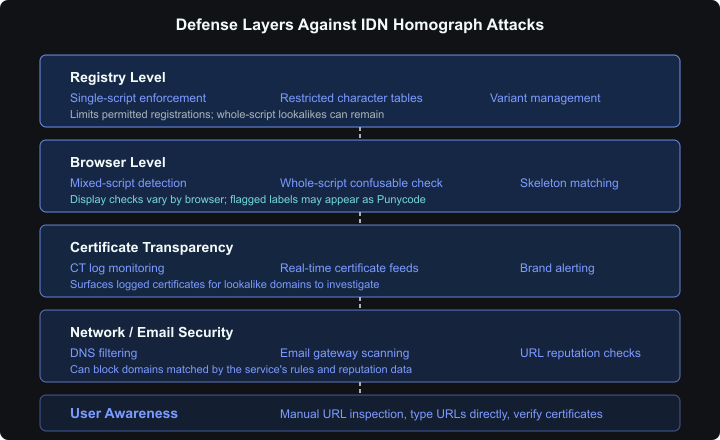 Defense layers: registry, browser, certificate transparency, network/email security, user awareness
Chrome checks identifier characters, script mixtures, invisible characters, whole-script confusables and skeleton matches against selected domains. A failed display check makes the label appear as Punycode11.
Firefox checks script combinations, restricted characters, confusable letters and digits, and context around combining marks. Some checks depend on the TLD. Setting network.IDN_show_punycode to true in about:config requests Punycode display for IDNs12.
Safari's WebKit uses allowed-script checks, lookalike-character checks and exceptions for particular TLDs. Its current source does not define a blanket ban on every mixed-script IDN13.
Edge inherited Chrome's IDN policy when it switched to Chromium in 2020.
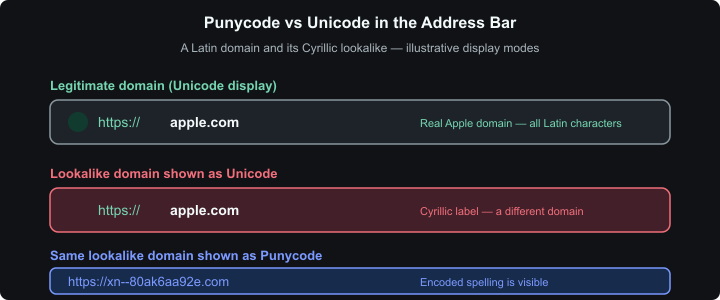 Illustration of a lookalike domain displayed as Unicode or Punycode
The 2021 USENIX study found bypasses in each browser it tested. Among 1,855 real-world homograph IDNs in its dataset, Chrome displayed Punycode for 64.1%, Safari for 9.7%, and Firefox for 6.1%14. These figures describe the study's dataset and browser versions, not current detection rates. The researchers also documented Chrome reversing some policies to avoid disrupting legitimate names.
Registry and certificate defenses
Browser detection is one layer. Preventing confusable domains from being registered is another.
ICANN's IDN Implementation Guidelines call for published character tables, restrictions on script mixing and variant management, including variants used in CJK scripts15. A single-script rule reduces possible combinations but still permits whole-script lookalikes. Registries such as .рф and .de use different character repertoires; a name permitted by one may be unavailable in the other.
Let's Encrypt distinguishes certificate validation from policing website content10. I find that distinction useful: an HTTPS connection and a trustworthy destination are separate questions. Certificate Transparency (CT) logs provide another source of evidence. Teams can monitor logged certificates for brand-lookalike domains using feeds such as CertStream, then investigate matches16.
Real-world incidents
This isn't just a researcher toy.
Akamai published a study in November 2022 analyzing DNS query traffic over 32 days and found 6,670 active homograph domains being queried by real devices. On average, 67 new ones appeared daily. A total of 29,071 devices accessed at least one homograph domain during the observation period, and the access patterns — typically 2-5 queries per device — suggested unintentional visits from phishing links17.
Bitdefender's 2022 analysis documented homograph attacks targeting financial institutions and cryptocurrency platforms — "a perfect target" because crypto transactions are irreversible18. They also found that Microsoft Office applications (Outlook, Word, Excel) were vulnerable in a different way: hovering over a link in a document showed the Unicode-decoded form, not the Punycode. Office had no confusable detection at all.
How to protect yourself
For individuals
- Type URLs manually for sensitive sites (banking, email, crypto). Don't click links from emails or messages.
- Inspect the destination domain if something feels off. Convert the hostname to its ASCII form; a valid certificate alone doesn't establish brand identity.
- Firefox users: set
network.IDN_show_punycodetotrueinabout:configif you prefer the encoded display12. - Use a password manager with domain matching. It can help notice a domain mismatch. Check its matching settings, and investigate before overriding an unexpected lack of autofill.
- Keep your browser updated to receive current display policies and security fixes.
For organizations
- DNS-level filtering through services like Cisco Umbrella or Cloudflare Gateway can block known homograph domains before they reach users.
- Email gateway scanning — most enterprise email security products check URLs for homograph patterns.
- Certificate Transparency monitoring via CertStream or SSLMate's Cert Spotter provides real-time alerts when certificates appear for brand-lookalike domains.
- Consider defensive registrations for likely brand variants. A registration reserves that particular name while you maintain it; other lookalikes may remain available.
The tension that won't go away
The fundamental problem is that visual similarity is subjective. Whether two characters "look the same" depends on the font, the rendering engine, the screen resolution, and the user's familiarity with the script. Unicode grows with every version — more characters from more scripts, expanding the potential attack surface.
You can't enumerate every confusable pair, because the visual similarity is a property of rendering, not code points. A new font could create new confusable pairs that nobody anticipated.
Registry rules, browser display checks, DNS filtering and CT monitoring each examine a different part of the problem. A familiar-looking URL and an HTTPS connection still need a domain-identity check.
Citations
-
Unicode Consortium: FAQ — International Domain Names (IDN). Retrieved September 7, 2026 ↩
-
Unicode Consortium: Unicode 16.0.0. Released September 10, 2024. Retrieved March 1, 2026 ↩
-
Evgeniy Gabrilovich and Alex Gontmakher: The Homograph Attack. Communications of the ACM, 45(2):128, February 2002 ↩
-
Computerworld: Experts: International domain names may pose threat. February 2005. Retrieved March 1, 2026 ↩
-
ICANN: ICANN Statement on IDN Homograph Attacks. February 23, 2005. Retrieved March 1, 2026 ↩
-
Mozilla Bugzilla: Bug 279099 — Protect against homograph attacks. Retrieved March 1, 2026 ↩
-
Xudong Zheng: Phishing with Unicode Domains. April 2017. Retrieved March 1, 2026 ↩ ↩2
-
Unicode Technical Standard #39: Unicode Security Mechanisms. Retrieved March 1, 2026 ↩ ↩2 ↩3
-
RFC 2181: Clarifications to the DNS Specification. Section 11. Retrieved September 7, 2026 ↩
-
Let's Encrypt: The CA's Role in Fighting Phishing and Malware. October 29, 2015. Retrieved March 1, 2026 ↩ ↩2
-
Chromium: Internationalized Domain Names (IDN) in Google Chrome. Retrieved March 1, 2026 ↩ ↩2
-
Mozilla: Firefox IDN service implementation. Retrieved September 7, 2026 ↩ ↩2
-
WebKit: URL display helpers. Retrieved September 7, 2026 ↩
-
Hang Hu, Steve T.K. Jan, Yang Wang, Gang Wang: Assessing Browser-level Defense against IDN-based Phishing. 30th USENIX Security Symposium, 2021 ↩
-
ICANN: IDN Implementation Guidelines. Version 4.1, published November 2022, effective for contracted gTLD registries April 2025. Retrieved September 7, 2026 ↩
-
Hardenize: Certificate Transparency Monitoring for Phishing Detection. Retrieved March 1, 2026 ↩
-
Akamai: Watch Your Step: The Prevalence of IDN Homograph Attacks. November 2022. Retrieved March 1, 2026 ↩
-
Bitdefender: Homograph Phishing Attacks — When User Awareness Is Not Enough. 2022. Retrieved March 1, 2026 ↩
Updated: September 7, 2026