
Punycode explained
What is Punycode?
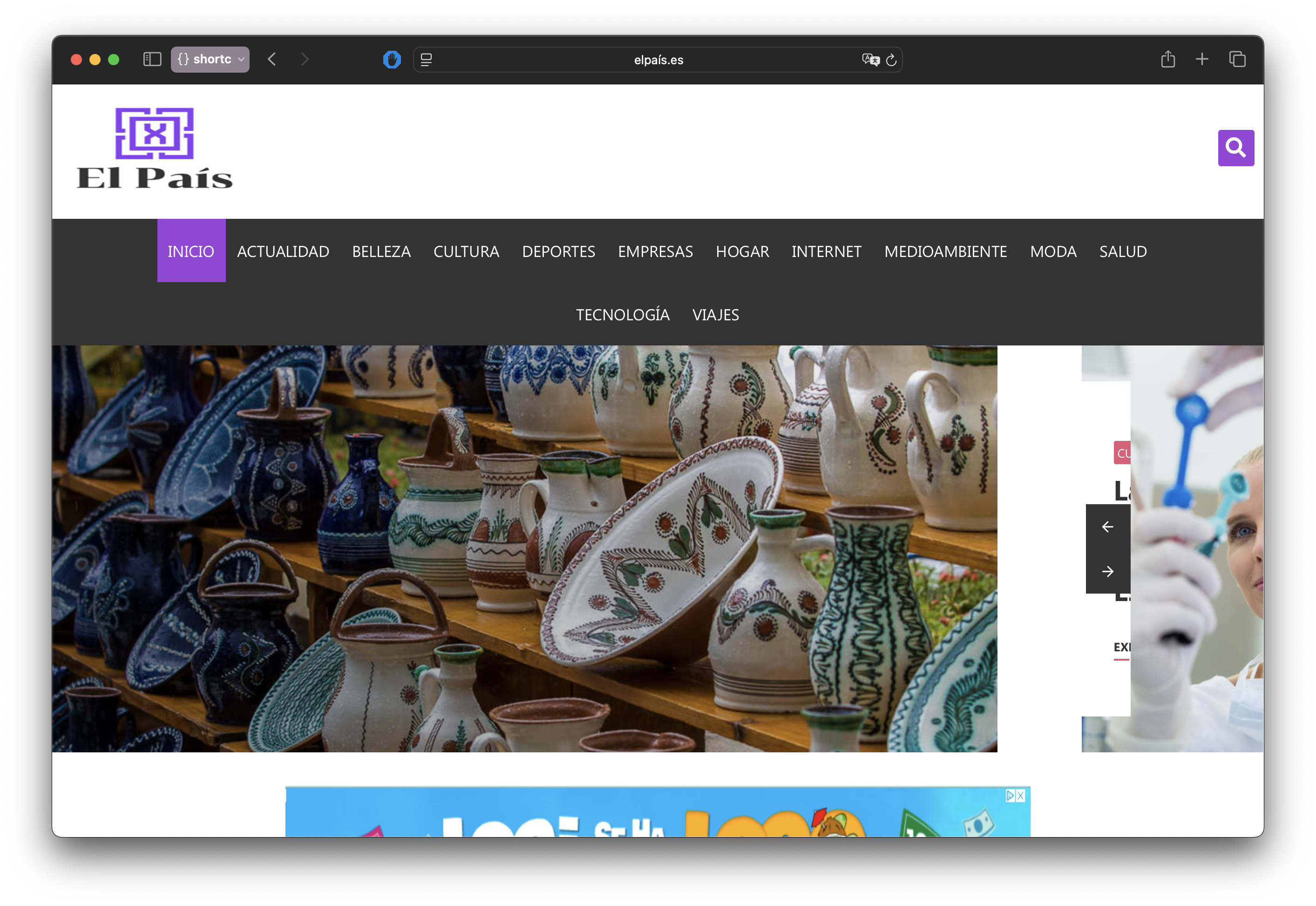 A Spanish website using an internationalized domain name
Punycode represents Unicode strings using ASCII: it preserves basic ASCII characters and encodes non-ASCII characters with letters and digits1. Its best-known use is in internationalized domain names. Traditional internet hostnames use ASCII letters, digits and hyphens2, although the Domain Name System itself permits arbitrary binary labels3.
IDNA uses Punycode for non-ASCII labels that meet its rules, then adds the xn-- prefix for applications to recognize4. Raw Punycode does not include that prefix. A name such as xn--nxasmq6b.com uses this ASCII form for lookups; whether a Unicode name can be registered also depends on registry policy5.
The name itself is a play on "Unicode" — the algorithm is "puny" because it uses a small character set, produces short encoded strings (DNS labels can't exceed 63 characters6), and has a surprisingly compact reference implementation.
When you need Punycode
Most developers never think about Punycode until they hit one of these situations:
- Registering an internationalized domain name. The registrar stores the
xn--form even if you typed Unicode into the search box. - Configuring DNS records. Use the IDNA ASCII form, such as
xn--nxasmq6b.com, when a DNS interface doesn't convert Unicode hostnames for you. - Getting an SSL certificate. Certificate authorities issue certs for the Punycode form. If you request a cert for the Unicode version without converting first, some tools will just reject it.
- Running a WHOIS lookup. A client without Unicode conversion needs
xn--l1acf9a0a.xn--p1aiforмосрег.рф. - Setting up email on an IDN domain. Punycode applies to domain labels after
@; a non-ASCII local part requires internationalized-email support. - Inspecting emoji domains. An input such as
💩.wscan be Punycode-encoded, but encoding alone doesn't establish IDNA validity or registration support.
Browsers handle conversion during navigation, although their address bars may expose the xn-- form.
Registering an IDN domain
A registrar may ask for a language or script tag to select the registry's IDN character table. The registry's published policy determines the permitted characters and any variant handling; tagging requirements differ between registries7.
Not every TLD supports every language. Each registry decides independently which scripts to allow, so availability is uneven. You might register a Cyrillic domain under .com but find that the same characters aren't available under .de. As of the June 2025 IDN annual report, 151 TLDs have been delegated as IDNs, covering 37 languages across 23 scripts8. Registries have published over 11,000 IDN tables — essentially lookup tables that define which Unicode characters are valid for a given TLD and language combination8.
The registration process itself is straightforward. Most registrars let you search using either the Unicode characters directly or a pre-converted Punycode string9. You type münchen.de, the registrar converts it to xn--mnchen-3ya.de behind the scenes, checks availability, and if it's open, registers the ACE form. Some registrars also ask you to confirm the language tag from a dropdown — German, in this case.
Email and IDN domains
Punycode applies to the domain part of an email address — everything after @. A non-ASCII local part uses UTF-8 through the SMTPUTF8 extension defined in RFC 6531, which can also carry a Unicode domain part10.
So 用户@xn--fiq228c.com is technically valid. The domain is Punycode, the local part is UTF-8. Two different encodings in a single email address. SMTP wasn't designed for any of this — the SMTPUTF8 extension was bolted on after the fact, and adoption has been slow.
The practical reality is worse than the spec suggests. Many web forms reject email addresses with non-ASCII characters outright — their validation regex only expects [a-zA-Z0-9] and a handful of special characters. Even large email providers have been slow to support SMTPUTF811. Gmail added support in 2014, but plenty of smaller providers still don't accept internationalized addresses.
If you're running a business on an IDN domain, test the mail providers and forms you depend on. An ASCII address can provide a fallback where internationalized addresses are rejected.
DNS, SSL, and WHOIS with IDN domains
DNS records for IDNA hostnames use the xn-- ACE form. When editing a zone or calling an API that expects that form, convert the non-ASCII labels before creating A/AAAA/CNAME records. A provider's dashboard may perform the conversion or show Unicode. This convention doesn't restrict the contents of every DNS record or zone-file field3.
SSL/TLS certificates work the same way. The certificate's Common Name or Subject Alternative Name contains the Punycode string, not the Unicode domain12. Let's Encrypt has supported IDN certificates since October 2016, and Certbot handles the conversion if you pass it the xn-- form directly. Some CAs accept the Unicode form in their web interface and convert it for you; others don't. When in doubt, convert to Punycode before requesting the cert.
WHOIS is the most annoying of the three. Most command-line WHOIS clients don't do any IDN-to-Punycode conversion — they just send whatever string you give them. Feed them Unicode and the lookup fails silently or returns nothing. You need to convert the domain to its xn-- form before querying. Web-based WHOIS tools from registrars usually handle the conversion automatically, but the raw protocol doesn't.
Browser address bar behavior
Each browser has its own policy for when to show the pretty Unicode version of a domain versus the raw xn-- Punycode. The differences matter because they determine how likely users are to notice a spoofed domain.
Chrome checks script combinations, confusable characters, digit spoofs and skeleton matches against selected domains. It permits some script mixtures, including combinations used in Japanese names, and shows Punycode when a display check fails13. A single-script name can still trigger a confusable check.
Firefox checks script combinations, restricted characters, combining marks and confusable letters and digits. Its rules include TLD-dependent checks. Users can request Punycode display by setting network.IDN_show_punycode to true in about:config14.
Safari's WebKit applies allowed-script and lookalike-character checks, with exceptions for particular TLDs15. These rules differ from Chromium's and Firefox's; they aren't a blanket rejection of mixed-script IDNs.
Edge follows Chromium's behavior, since it's built on the same engine.
Emoji domains
Emoji can be Punycode-encoded: ☕.ws becomes xn--53h.ws. That doesn't make the name IDNA-valid. IDNA excludes symbols such as emoji, even where a registry has historically accepted them5.
InterNetX has described emoji registrations under .ws (Samoa), .to (Tonga), .fm (Micronesia) and .kz (Kazakhstan), plus historical examples under .tk, .ml, .ga, .gq, .cf, .st and .uz16. Treat that as background, not a current availability list. ICANN's IDNA-based rules for gTLDs exclude emoji7.
Brands have used emoji domains in campaigns, including Coca-Cola on .ws in 201516. I would test application support before relying on one: registration and Punycode conversion don't establish that mail software or another URL consumer accepts the name. Logs and analytics may show its encoded form, such as xn--53h.ws.
How Punycode encoding works
Under the hood, Punycode is a specific instance of the Bootstring algorithm, which was designed to represent strings from a large character set using a much smaller one1. Adam Costello published the specification as RFC 3492 in March 2003 while at UC Berkeley.
The following example uses "čáslav" (a Czech town). Three steps produce raw Punycode; a fourth shows how IDNA uses the result:
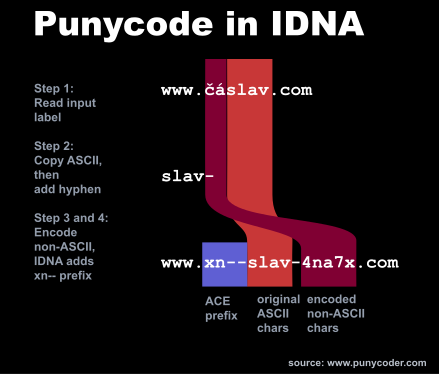 Punycode algorithm
Step 1 — Separate ASCII characters. Pull out every character that's already plain ASCII. From "čáslav", that gives us: slav.
Step 2 — Add a hyphen separator. If there were any ASCII characters, append a trailing hyphen to mark where they end: slav-. The last hyphen in the output is always the separator, so hyphens inside the original input don't cause ambiguity.
Step 3 — Encode the non-ASCII characters. The remaining characters (č and á) get processed by the Bootstring algorithm, which encodes their Unicode code points and positions into a sequence of a-z and 0-9. The result gets appended: slav-4na7x17.
Step 4 — IDNA adds the xn-- prefix. Raw Punycode is slav-4na7x; the IDNA ASCII label is xn--slav-4na7x.
Bootstring adapts a bias value to the size of the deltas it encodes, making many domain labels compact17. It doesn't guarantee the shortest possible representation. An IDNA ASCII label, including xn--, must fit the DNS limit of 63 bytes.
Punycode examples
The table shows IDNA ASCII forms, including the prefix. IDNA does not Punycode-encode ordinary ASCII-only labels. Raw Punycode behaves differently: encoding abc produces abc-1.
| Input | IDNA ASCII form | Script |
|---|---|---|
café | xn--caf-dma | French |
münchen | xn--mnchen-3ya | German |
español | xn--espaol-zwa | Spanish |
école.fr | xn--cole-9oa.fr | French domain |
bücher.de | xn--bcher-kva.de | German domain |
| Chinese: 中文 | xn--fiq228c | Chinese |
| Japanese: 日本語 | xn--wgv71a119e | Japanese |
| Korean: 한국어 | xn--3e0bk47br7k | Korean |
| Arabic: تست | xn--pgba0a | Arabic |
| Greek: δοκιμή | xn--jxalpdlp | Greek |
When an input label contains ASCII characters, Punycode copies them first and adds a hyphen before its encoded non-ASCII portion. With no ASCII characters, it adds no delimiter. IDNA handles labels separately: in école.fr, only école needs Punycode encoding; .fr stays as-is.
IDN homograph attacks — the security risk
Non-ASCII domain names introduce another way to impersonate a familiar address.
An IDN homograph attack exploits similar-looking characters from different scripts. Cyrillic lowercase "а" (U+0430) can resemble Latin "a" (U+0061), depending on the font18. If registration rules permit a lookalike name and the browser shows Unicode, it may appear to be a familiar domain.
The concept was first described in 2001 by Evgeniy Gabrilovich and Alex Gontmakher at the Technion in Israel. They registered a spoofed microsoft.com using Cyrillic characters and published their findings in Communications of the ACM19. Their warning proved prescient.
Homoglyph examples:
| Latin | Cyrillic lookalike | Latin code point | Cyrillic code point | Spoof target |
|---|---|---|---|---|
| a | а (Cyrillic) | U+0061 | U+0430 | apple.com |
| e | е (Cyrillic) | U+0065 | U+0435 | ebay.com |
| o | о (Cyrillic) | U+006F | U+043E | google.com |
| p | р (Cyrillic) | U+0070 | U+0440 | paypal.com |
| c | с (Cyrillic) | U+0063 | U+0441 | cisco.com |
| x | х (Cyrillic) | U+0078 | U+0445 | express.com |
Cyrillic lookalikes can form an entire label resembling a Latin name without mixing scripts.
A widely reported demonstration happened in April 2017. Security researcher Xudong Zheng registered xn--80ak6aa92e.com, which decodes to аррӏе.com — an all-Cyrillic label resembling apple.com20. The tested Chrome, Firefox and Opera versions displayed the lookalike, and Zheng obtained a valid TLS certificate for it. He had reported the bug to Chrome in January 2017 and received a $2,000 bounty. Chrome patched this example in version 5820.
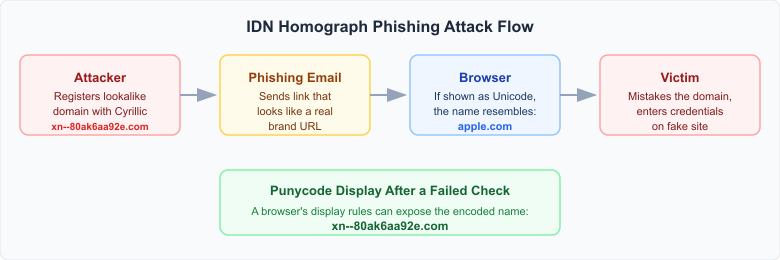 Phishing attack flow using a Punycode lookalike domain
Limits of browser display checks
Punycode display exposes the encoded spelling, but the browser still has to decide which labels to flag. The policies described above combine Unicode character properties with browser-specific rules.
Chrome's whole-script checks consider both the label and its TLD. A label made entirely of Cyrillic lookalikes can trigger Punycode display under .com, while a TLD associated with Cyrillic names can change that decision13.
Firefox's script checks permit selected combinations, including Latin + Han + Hiragana + Katakana, while rejecting Latin mixed with Cyrillic or Greek14. Unicode Technical Standard #39 describes the confusable and script-restriction concepts behind such policies21.
Safari and Edge did not display Zheng's 2017 example as the Apple lookalike20. That observation doesn't rank their defenses against other examples or current browser versions.
A 2021 USENIX Security paper found bypasses in every browser it tested22. Among 1,855 real-world homograph IDNs, its tested Chrome version showed Punycode for 64.1%, Safari for 9.7%, and Firefox for 6.1%. Those are historical results for that dataset, not current detection rates.
How to protect yourself
Browser display checks are one source of evidence. Use the underlying domain, rather than its visual resemblance, when deciding where to enter credentials:
-
Use a password manager with domain matching. It can help notice a mismatch between the current site and a saved login. Matching modes and autofill settings vary; investigate before overriding an unexpected lack of autofill.
-
Keep your browser updated to receive current IDN policies and security fixes. A policy change does not necessarily make detection stricter: browsers also adjust rules to accommodate legitimate names.
-
Use a known address for sensitive sites. Open a saved bookmark or type a known banking, email or shopping address rather than relying on an unfamiliar message link.
-
Inspect link destinations. A tooltip or status bar can reveal a different address, but some applications display Unicode lookalikes there too. Convert a suspicious hostname to ASCII for comparison.
-
Don't ignore certificate warnings. Investigate a mismatch rather than bypassing it. A valid certificate for a lookalike domain, as in the 2017 demonstration, does not prove brand identity.
Citations
-
RFC 3492: Punycode: A Bootstring encoding of Unicode for Internationalized Domain Names in Applications (IDNA). A. Costello, March 2003 ↩ ↩2 ↩3
-
RFC 1035: Domain Names — Implementation and Specification. P. Mockapetris, November 1987 ↩
-
RFC 2181: Clarifications to the DNS Specification. Section 11. Retrieved September 7, 2026 ↩ ↩2
-
RFC 3490: Internationalizing Domain Names in Applications (IDNA). Retrieved March 16, 2026 ↩
-
Unicode Consortium: FAQ — International Domain Names (IDN). Retrieved September 7, 2026 ↩ ↩2
-
RFC 1035: Domain Names — Implementation and Specification. Section 2.3.4. Retrieved March 16, 2026 ↩
-
ICANN: Guidelines for the Implementation of Internationalized Domain Names. Version 4.1, November 2022 ↩ ↩2
-
ICANN: IDN Annual Report June 2025. Retrieved March 17, 2026 ↩ ↩2
-
Porkbun: Internationalized Domain Names. Retrieved March 17, 2026 ↩
-
RFC 6531: SMTP Extension for Internationalized Email. A. Yang, S. Steele, N. Freed, February 2012 ↩
-
Mozilla: Bug 1563891 — No support for SMTPUTF8. Retrieved March 17, 2026 ↩
-
Let's Encrypt: Introducing Internationalized Domain Name (IDN) Support. October 21, 2016 ↩
-
Chromium: Internationalized Domain Names (IDN) in Google Chrome. Retrieved March 16, 2026 ↩ ↩2
-
Mozilla: Firefox IDN service implementation. Retrieved September 7, 2026 ↩ ↩2
-
WebKit: URL display helpers. Retrieved September 7, 2026 ↩
-
InterNetX: Emoji Domains — Yay or Nay?. Retrieved March 17, 2026 ↩ ↩2
-
RFC 3492: Punycode: A Bootstring encoding of Unicode for IDNA. Sections 3 and 6. Retrieved March 16, 2026 ↩ ↩2
-
Unicode Technical Report #36: Unicode Security Considerations. Retrieved March 16, 2026 ↩
-
Evgeniy Gabrilovich and Alex Gontmakher: The Homograph Attack. Communications of the ACM, 45(2):128, February 2002 ↩
-
Xudong Zheng: Phishing with Unicode Domains. April 2017. Retrieved March 16, 2026 ↩ ↩2 ↩3
-
Unicode Technical Standard #39: Unicode Security Mechanisms. Retrieved March 16, 2026 ↩
-
Hang Hu, Steve T.K. Jan, Yang Wang, Gang Wang: Assessing Browser-level Defense against IDN-based Phishing. 30th USENIX Security Symposium, 2021 ↩
Updated: September 7, 2026